STUDIO March 12, 2024
6 Ways to Make Authentication More User-Friendly
Six design principles for secure authentication that works across devices, abilities and levels of technical confidence.
Registration and sign-in are often the first moments of commitment in a customer journey. A secure system should protect people without making legitimate access needlessly difficult.
1. Design for the whole account lifecycle
Consider registration, verification, everyday sign-in, recovery, device change and account closure as one system. Many experiences optimize the happy path while leaving users stranded when an email address changes or a recovery method is unavailable.
2. Keep patterns consistent across platforms
Web, mobile and support channels should use the same terminology and explain the same security state. Respect platform conventions, but do not force users to relearn the account model on every device.
3. Offer appropriate authentication choices
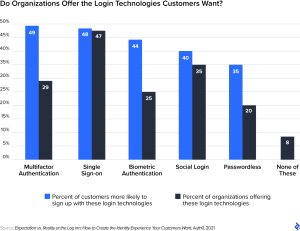
Depending on risk, users may benefit from passkeys, password managers, social sign-in, biometrics or one-time codes. Choice should be manageable and accessible; too many unexplained options create a different kind of friction.
4. Make password use easier
Allow paste, support password managers, show requirements before submission and offer a reveal control. Avoid arbitrary composition rules that produce predictable passwords. Use secure rate limiting and breached-password checks instead.
5. Explain security at the moment it matters
Use plain language for verification, consent, failed attempts and suspicious activity. Error messages should state what happened and provide a safe next step without revealing information that helps an attacker.
6. Test with diverse users and devices
Include people with different levels of technical confidence and accessibility needs. Test low-bandwidth conditions, old sessions, interrupted flows and recovery. Security and usability are not opposing goals: a system people understand is less likely to be bypassed or abandoned.